
Performance Max (PMax) in Google Ads has become one of Google’s most powerful campaign types, but it has also introduced a common challenge for us advertisers: limited control over who sees your ads. While Google’s automation can be highly effective, there are certain situations where you don’t want specific users interacting with your PPC campaigns.
Data exclusions solve this problem by allowing advertisers to exclude audiences such as existing customers, previous lead submitters, and website visitors from their campaigns. For business owners and marketing managers focused on acquiring new customers, these exclusions can help improve lead quality, reduce wasted spend, and provide a more accurate picture of campaign performance.
Exclusions in PMax are a fine-tuning step, most useful once your core account structure is already solid. See our Google Ads guide for the initial foundation needed for effective management.
In this article, we’ll explain how Performance Max data exclusions work, when you should use them, and how to implement them effectively.

What Are Performance Max Data Exclusions?
PMax data exclusions allow you to prevent specific audience lists from being targeted within a campaign. These exclusions act as restrictions that remove selected users from your campaign’s reach.
This is an important distinction because Performance Max has historically relied heavily on automation. While features such as audience signals help Google understand who your ideal customer might be, they don’t stop Google from showing ads to other users if it believes they are likely to convert.
With this recent update, data exclusions now give Google Ads managers a greater level of control.
For example, imagine you’re running a lead generation campaign for a financial services company. Someone completes a lead form and enters your sales process. Without an exclusion in place, Google may continue showing ads to that individual because they are still interacting with your website and demonstrating strong engagement signals.
From Google’s perspective, that person looks like a valuable prospect. From your perspective, they are already a lead.
This is where audience exclusions become valuable.
Why Audience Exclusions Matter in Performance Max
As a Google Ads agency, one of the biggest frustrations we experience when managing campaigns is the difficulty in separating genuine customer acquisition from repeat engagement.
Many Performance Max campaigns generate conversions from users who already know the brand. These users may revisit the website multiple times, complete additional forms, or continue researching before making a final purchase decision.
While these conversions often look positive in reporting, they can distort performance metrics.
A campaign that appears to be generating leads at a low cost may actually be retargeting users who were already in your pipeline. This makes it difficult for marketing managers to accurately assess acquisition costs and can create a false sense of campaign success. This is the same distortion covered in our guide to fixing Google Ads spam leads, inflated conversion counts that don’t reflect genuine new demand
By excluding audiences that have already converted, your business can gain a clearer understanding of how effectively Performance Max is attracting genuinely new opportunities.
For organisations focused on growth, this distinction is critical.
Your Google Ads not delivering the results you expect?
Most marketing managers or business owners we speak to have a gut feeling something is off. Their CPCs are climbing, leads are dropping, and the reports that look good but don’t match reality. A 15-minute call with one of our Google Ads specialists costs nothing and gives you an honest, no-obligation view of what’s actually happening in your account.
Book a free 15-minute call →When Should You Use Data Exclusions in Performance Max?
There isn’t a cookie cutter scenario where audience exclusions should be applied. Instead, they are most effective when used to solve your specific business challenges.
Excluding Existing Customers
One of the most common use cases is excluding existing customers.
If your objective is customer acquisition, spending budget on people who have already purchased may not be the most efficient use of advertising spend.
For example, an eCommerce retailer running a new customer acquisition campaign may want to prevent existing customers from seeing prospecting ads. This ensures the campaign focuses on reaching entirely new audiences rather than generating repeat purchases that could have happened organically.
Excluding Previous Lead Submitters
For lead generation businesses, excluding previous lead submitters is often one of the highest-impact audience exclusions available.
Imagine a user submits a quote request for solar panels. Over the following weeks, they continue researching providers and return to your website multiple times.
Without an exclusion, Performance Max may continue serving ads to this same user. While they may eventually convert again, the campaign is spending budget on someone who is already in your sales pipeline.
By excluding previous lead submitters, you can focus your advertising budget on generating new enquiries rather than repeatedly targeting existing prospects.
This strategy becomes even more powerful when combined with accurate offline conversion tracking. If you’re already tracking leads through a CRM, our guide on Google Ads offline conversions explains how to connect those leads back to Google Ads and improve bidding performance.
Excluding Website Visitors
Many advertisers separate their acquisition and remarketing strategies.
Rather than allowing Performance Max to serve ads to previous website visitors, they use exclusions to create a cleaner prospecting campaign while managing remarketing separately.
This approach provides greater control over messaging, budget allocation, and campaign objectives.
However, this isn’t always the right strategy.
For businesses with lower traffic volumes, excluding all website visitors may limit Google’s ability to find qualified users. Before implementing broad exclusions, it’s important to consider the size of your audiences and your overall acquisition goals.
Excluding Users Based on Specific Website Pages
Not every website visitor is a potential customer. In many cases, users visit pages that indicate they are unlikely to become a lead or purchase a product.
For example, if someone visits your careers page, support portal, customer login area, or recruitment section, they may not be part of your target audience for a lead generation campaign. By creating audiences based on visits to these specific pages and excluding them from your Performance Max campaign, you can help Google focus its budget on users who are more likely to convert.
This strategy can be particularly useful for businesses with large websites where traffic serves multiple purposes. Rather than allowing all website visitors to remain eligible for targeting, you can use page-based audience exclusions to improve audience quality and reduce unnecessary spend.
How to Exclude Audiences from Performance Max Campaigns
The first step is ensuring you have audience lists available inside Google Ads or GA4.
These audiences can be created using website visitor data, Customer Match uploads, CRM data, or specific user actions such as form submissions. Before building these audiences, make sure your Google Ads conversion tracking is capturing the right actions, that’s what determines who ends up on each list
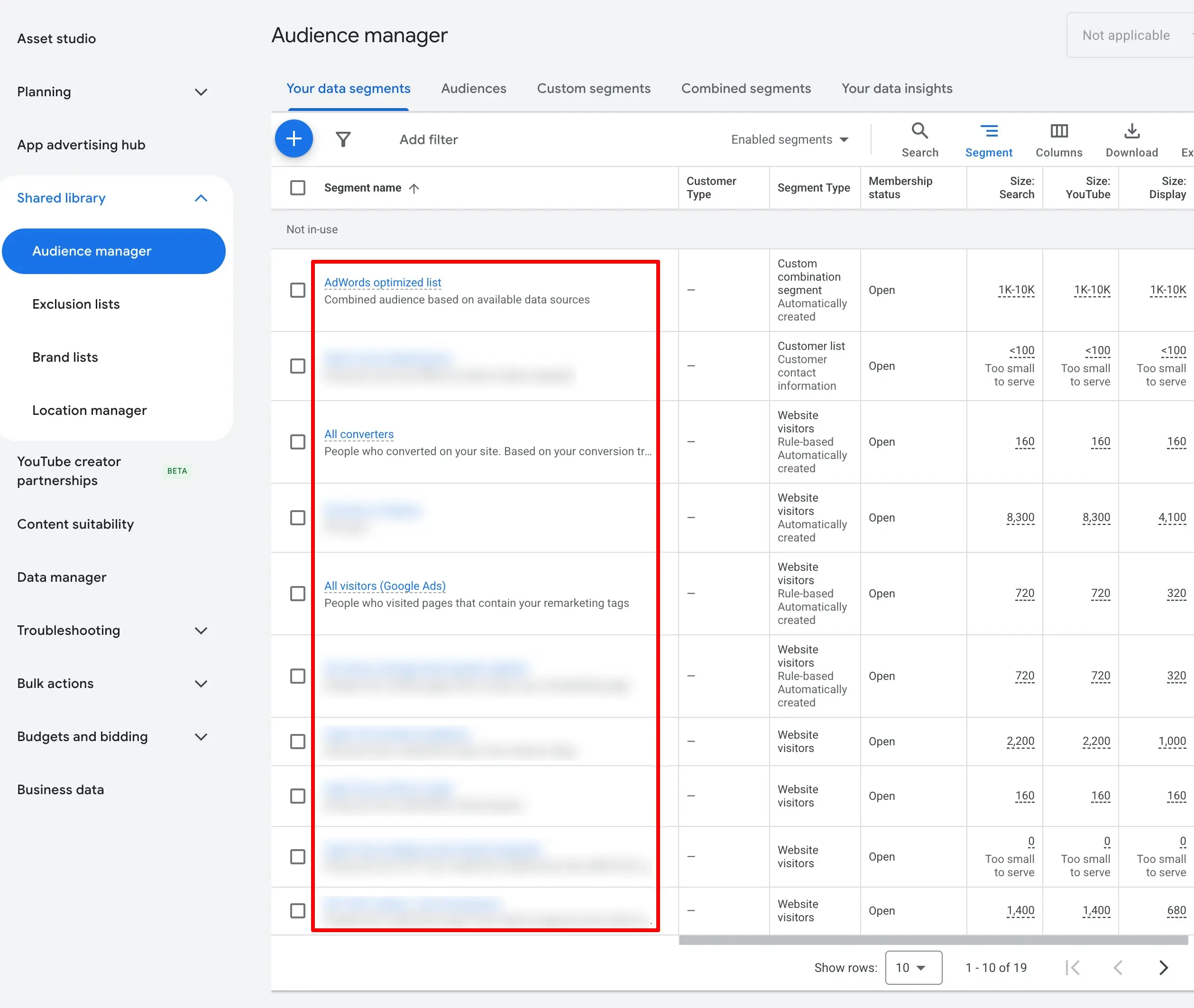
For lead generation businesses, one of the most valuable audiences is often a lead submitter audience. By building an audience around users who have completed an enquiry form, you can prevent your prospecting campaigns from targeting people who have already entered your sales funnel.
Once the audience exists, navigate to your Performance Max campaign settings and locate the audience exclusion controls.
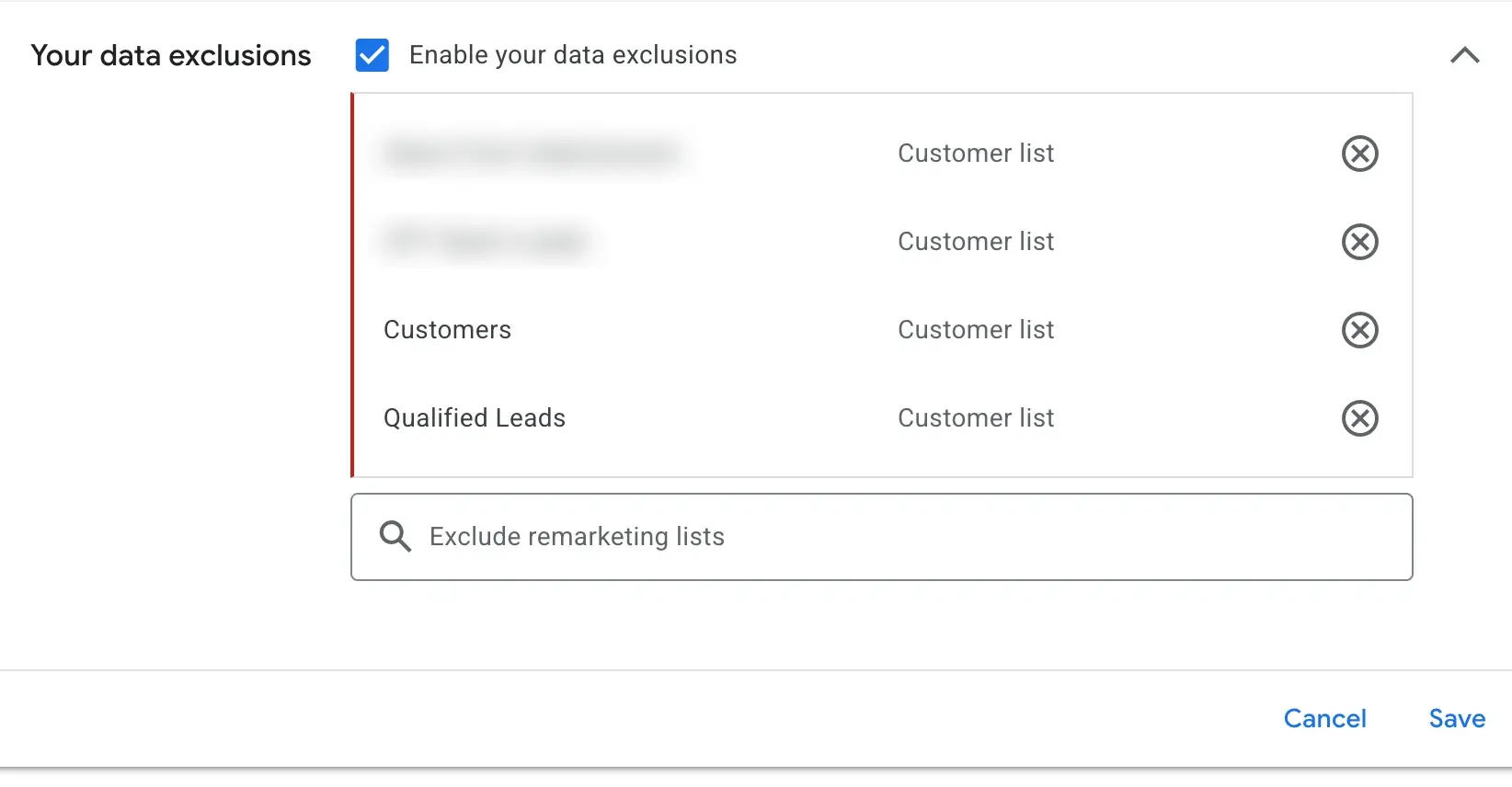
After selecting the audience(s) you wish to exclude, save the campaign and monitor performance closely over the following weeks.
Don’t focus solely on conversion volume.
Instead, evaluate:
- Cost per lead
- Lead quality
- New customer acquisition
- Cost per acquisition
- Sales outcomes
In many cases, conversion volume may decrease slightly while lead quality improves significantly. For a full framework on which of these metrics actually matter and how to report them to stakeholders, see our guide to paid media reporting.
Performance Max Data Exclusions vs Audience Signals
One of the most common misconceptions surrounding Performance Max is the belief that audience signals act as targeting restrictions.
They do not.
Audience signals are best thought of as recommendations. They provide Google with information about who you believe your ideal customer is, but the platform remains free to expand beyond those audiences if it predicts strong performance.
Data exclusions work differently.
| Feature | Audience Signals | Data Exclusions |
|---|---|---|
| Purpose | Guide Google’s learning | Restrict targeting |
| Reach | Expandable | Restricted |
| User Eligibility | Can be expanded beyond the audience | Cannot be served ads |
| Best Use Case | Discovery and learning | Audience filtering |
| Control Level | Low | High |
Understanding this distinction is essential when building effective Performance Max campaigns.
Best Practices for Performance Max Audience Exclusions
The most successful Google Ads accounts don’t use exclusions to limit Google’s learning. They use them strategically to improve campaign quality.
Start with audiences that clearly no longer belong in the acquisition journey, such as existing customers or previous lead submitters.
Avoid excluding large groups without a clear business reason. Overly aggressive exclusions can restrict campaign reach and reduce Google’s ability to identify new conversion opportunities.
It’s also important to regularly review your audience lists. Customers, leads, and website visitors change over time. What made sense six months ago may no longer align with your current campaign objectives.
Most importantly, measure outcomes beyond the Google Ads interface. Improved lead quality, stronger sales performance, and higher customer acquisition efficiency are often better indicators of success than simple conversion volume.
Final Thoughts on Performance Max Data Exclusions
Performance Max data exclusions represent an important step towards giving advertisers greater control over Google’s most automated campaign type.
For business owners, they provide a way to ensure advertising budgets are focused on generating new opportunities rather than repeatedly targeting people who have already converted. For marketing managers, they offer cleaner reporting, improved acquisition measurement, and greater confidence in campaign performance.
As Performance Max continues to evolve, understanding how to balance automation with strategic control will become increasingly important. Audience exclusions won’t replace strong campaign management, but they can help ensure Google’s machine learning is working with the right users from the outset.
If you’re looking to improve the performance of your Performance Max campaigns, working with a specialist Google Ads agency can help you implement advanced audience strategies, improve conversion tracking, and maximise your return on ad spend.