The challenge many WordPress sites face is that the GCLID parameter is often lost when a user navigates between pages before completing a form, making accurate offline conversion tracking impossible.
In this guide, we’ll explain why GCLID’s are critical for Google Ads offline conversions, and how to correctly capture and store it in WordPress so it’s available at the point of conversion. We’ll also cover common tracking issues, how Google Ads processes offline conversions, and practical solutions to ensure your conversion data remains accurate and reliable. This specific article builds on the fundamentals covered in our guide to setting up Google Ads conversion tracking.
Measuring offline conversions is one piece of the tracking puzzle. See our Google Ads guide for how offline conversions fit into the bigger measurement picture.

What Is GCLID in Google Ads?
GCLID stands for Google Click Identifier. It is a unique tracking parameter that Google Ads automatically appends to your landing page URL when someone clicks on one of your ads. This identifier allows Google to track exactly which ad click led to a conversion, even if that conversion happens later or outside of your website.
When a user clicks a Google Ad, the GCLID parameter is added to the URL, typically looking something like this:
https://example.com/?gclid=123ABC456DEF

This value acts as a bridge between your website activity and your Google Ads account. When a conversion is recorded and the GCLID is included, Google Ads can accurately attribute that conversion back to the original click, campaign, ad group, and keyword. Without GCLID, Google Ads has no reliable way to match offline or delayed conversions to the correct ad interaction. This is why GCLID is a critical requirement for Google Ads offline conversion tracking, particularly for businesses that rely on lead forms, phone calls, or CRM-based sales rather than instant online purchases.
What Are Google Ads Offline Conversions?
Google Ads offline conversions refer to conversions that occur outside of your website, after an initial ad click. Instead of happening immediately online, these conversions are completed later through actions such as form submissions, phone calls, in-store visits, or sales recorded in a CRM system. By using offline conversion tracking, businesses can tell Google Ads which ad clicks actually resulted in real leads or revenue.
In each of these scenarios, the conversion does not occur instantly on the landing page, which is why relying on standard online conversion tracking alone can lead to incomplete or inaccurate performance data.
Offline conversions play a crucial role in smart bidding and campaign optimisation. When Google Ads receives accurate offline conversion data tied to GCLID, it can optimise bids based on real business outcomes rather than surface-level metrics like clicks or page views. This allows automated bidding strategies to prioritise higher-quality leads, improve return on ad spend, and allocate budget more effectively across campaigns.
Why GCLID Gets Lost on WordPress Websites
One of the most common challenges with Google Ads offline conversion tracking in WordPress is that the GCLID parameter is often lost before a user submits a form. This happens because many WordPress sites are not set up to persist URL-based tracking data across multiple pages or sessions.
A frequent issue is the landing page versus form submission mismatch. A user may click on a Google Ad, land on a campaign-specific page with a GCLID attached, and then navigate to another page, such as a contact or enquiry page, to complete the form. If the GCLID is not stored when the user first arrives, it will no longer be available on the final form submission page.
Page navigation and session breaks also contribute to this problem. Users may browse multiple pages, refresh the site, or return later in the same session. Without a mechanism to store the GCLID, such as a cookie or local storage, the identifier is lost as soon as the original URL parameter disappears.
Another common issue is forms that do not persist URL parameters. Many WordPress form builders only capture visible form fields and do not automatically include URL parameters like GCLID. Unless the GCLID is explicitly passed into a hidden field, it will never be submitted with the form data.
Finally, relying on “thank you page only” tracking fails for offline conversions. Thank you pages may fire a conversion event, but without the GCLID being present at submission time, Google Ads cannot match that conversion back to the original ad click. This results in conversions that appear unattributed or are excluded from smart bidding entirely.
Understanding why GCLID gets lost is the first step toward fixing offline conversion tracking in WordPress. The next step is ensuring the GCLID is captured and stored correctly from the moment a user clicks on your ad.
How to Capture GCLID in WordPress Correctly
To track Google Ads offline conversions accurately, the GCLID must be captured as soon as a user lands on your site and retained until the point of conversion. In WordPress, this requires a deliberate approach, as GCLID is not stored automatically and will be lost without intervention. The most reliable solution involves storing the GCLID when it first appears and ensuring it remains accessible throughout the user journey.

This is the exact problem we encountered when building WordPress-based landing pages for our Google Ads clients, which led us to develop a dedicated WordPress plugin designed specifically to capture and persist GCLID for Google Ads offline conversion tracking.
Storing GCLID in a Cookie
The most reliable way to capture GCLID in WordPress is by storing it in a first-party cookie when the user first arrives from a Google Ad. Cookies allow the GCLID to persist across pages, refreshes, and short-term return visits, making them ideal for offline conversion tracking.
When a user lands on your site with a ?gclid= parameter in the URL, the cookie stores that value immediately. From that point on, the GCLID can be retrieved at any time, including when a form is submitted on a different page.
Cookie lifespan considerations are important. The cookie should last long enough to cover the typical user journey, which may span several minutes, hours, or even days. Many businesses choose a lifespan of 30 to 90 days to align with their sales cycle and Google Ads attribution windows.
Our WordPress plugin was built with this in mind, automatically handling cookie creation and retrieval in a compliant and lightweight way, without requiring custom code for each site.

Passing GCLID Between Pages
Capturing GCLID once is not enough; it must also be available wherever the conversion happens.
The process starts by reading the GCLID from the URL when a user first arrives. If the parameter exists, it is immediately stored and no longer depends on the URL itself.
Next, the GCLID needs to be persisted across page views. As users navigate your WordPress site, the stored GCLID remains accessible, even though it is no longer visible in the browser address bar. This ensures the identifier survives internal navigation, page reloads, and multi-step journeys.
Finally, the GCLID must be made available at form submission. This typically involves injecting the stored GCLID into a hidden form field at the moment the user submits their enquiry. Without this step, the GCLID never reaches your backend systems, CRM, or offline conversion upload process.
The plugin we built automates this entire flow, from capturing the GCLID on entry, storing it securely, and attaching it to form submissions automatically. This removes the need for manual workarounds, JavaScript hacks, or reliance on fragile URL-based tracking.
With GCLID captured and persisted correctly, WordPress sites can finally track Google Ads offline conversions with the accuracy required for smart bidding and performance optimisation.
Tracking Google Ads Offline Conversions Using GCLID
Once GCLID is captured and stored correctly, the next step is using it to track Google Ads offline conversions accurately. This process connects real-world outcomes, such as leads or sales, back to the original ad click, allowing Google Ads to optimise campaigns based on meaningful business results rather than surface-level metrics.

In the example above, we spent a total of R50,582 over 3 months. Using offline conversion tracking, and submitting that data back to our Ads account, the leads resulted in a total of R827,456 in revenue for the client.
The process starts with mapping form submissions to GCLID. When a user submits a form on your WordPress site, the stored GCLID must be attached to that submission. This ensures that every lead can be traced back to a specific Google Ads click. Without this link, the conversion exists in isolation and cannot be attributed to the correct campaign, ad group, or keyword.
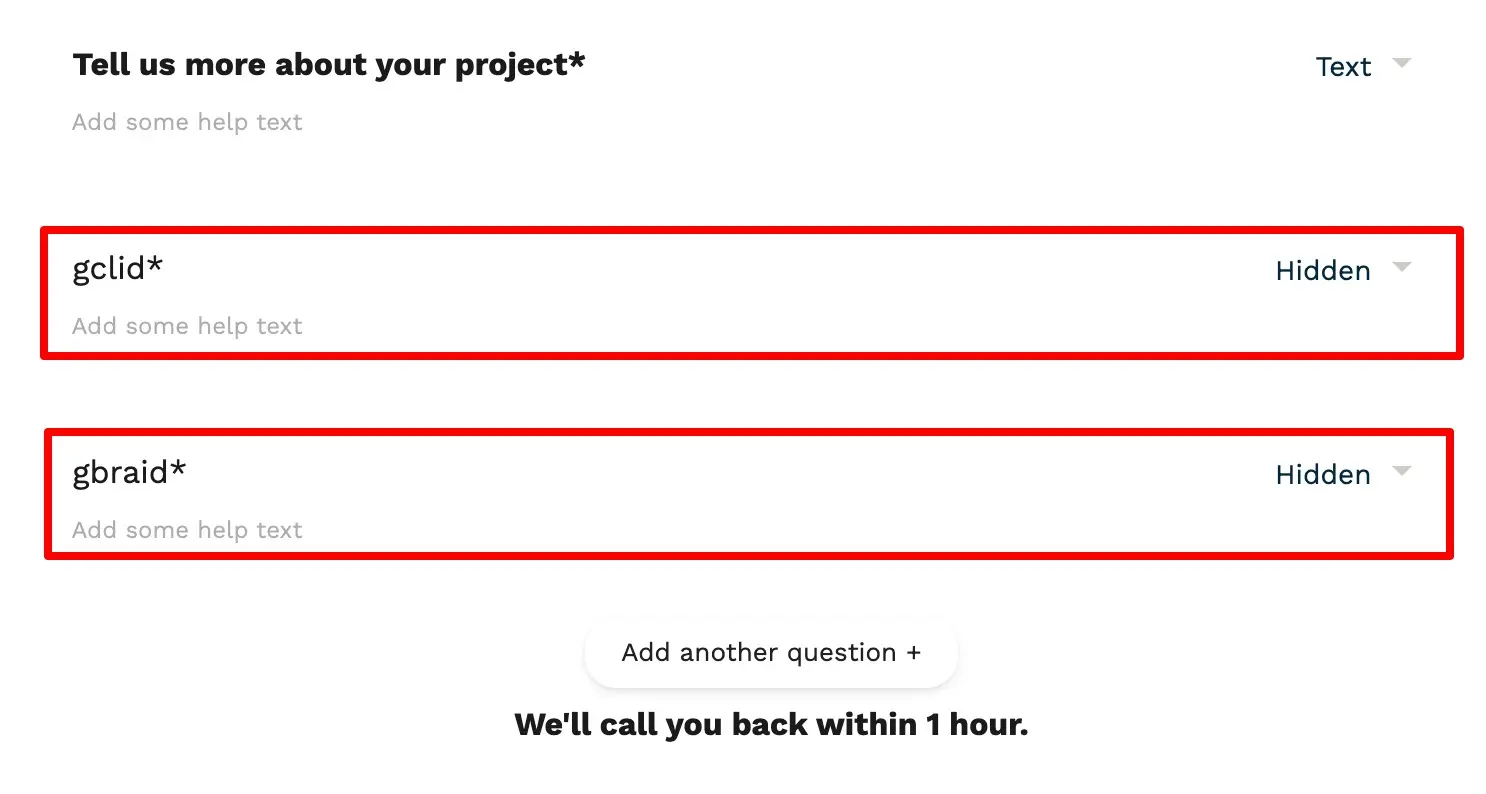
Next, those conversions need to be sent back to Google Ads. This is typically done by uploading offline conversions manually, syncing them through a CRM, or using an automated integration. Google Ads then matches the uploaded GCLID to the original click and records the conversion against your campaigns. Once this data is available, smart bidding strategies can begin optimising for actual leads or sales rather than just clicks.

Accuracy is critical for optimisation. Incomplete or inconsistent GCLID data leads to poor attribution, which can misguide automated bidding and budget allocation. When offline conversions are tracked correctly, Google Ads gains a clearer understanding of which clicks drive real value, resulting in improved performance, stronger return on ad spend, and more reliable reporting.
Our WordPress plugin is built to support this process end to end by ensuring that every eligible form submission includes the correct identifier, reducing data loss and improving the quality of offline conversion uploads.
GCLID vs GBRAID Explained
As privacy regulations and device tracking restrictions have evolved, Google has introduced additional identifiers alongside GCLID, most notably GBRAID and WBRAID.
GCLID is the traditional Google Click Identifier used for standard Google Ads clicks, primarily on desktop and some mobile environments where full tracking is permitted.
GBRAID and WBRAID are newer identifiers used in scenarios where user-level tracking is restricted, such as certain mobile devices, app-based interactions, or privacy-focused environments. These identifiers allow Google Ads to maintain attribution while respecting privacy constraints.
Each identifier is used under different conditions, and not every click will generate a GCLID. This is why modern offline conversion tracking must be able to handle all three identifiers, not just GCLID alone. Ignoring GBRAID or WBRAID can result in missed conversions and incomplete performance data.
Our plugin captures GCLID, GBRAID, and WBRAID automatically, ensuring that WordPress sites remain compatible with Google Ads’ evolving tracking requirements. This approach future-proofs offline conversion tracking and ensures that no valuable conversion data is lost due to identifier limitations.
Google Ads Offline Conversions Template Explained
To send offline conversions back into Google Ads, Google requires the use of an offline conversion upload template. This template is typically uploaded via Google Ads or synced through a CRM and is the mechanism Google uses to match offline actions back to ad clicks.
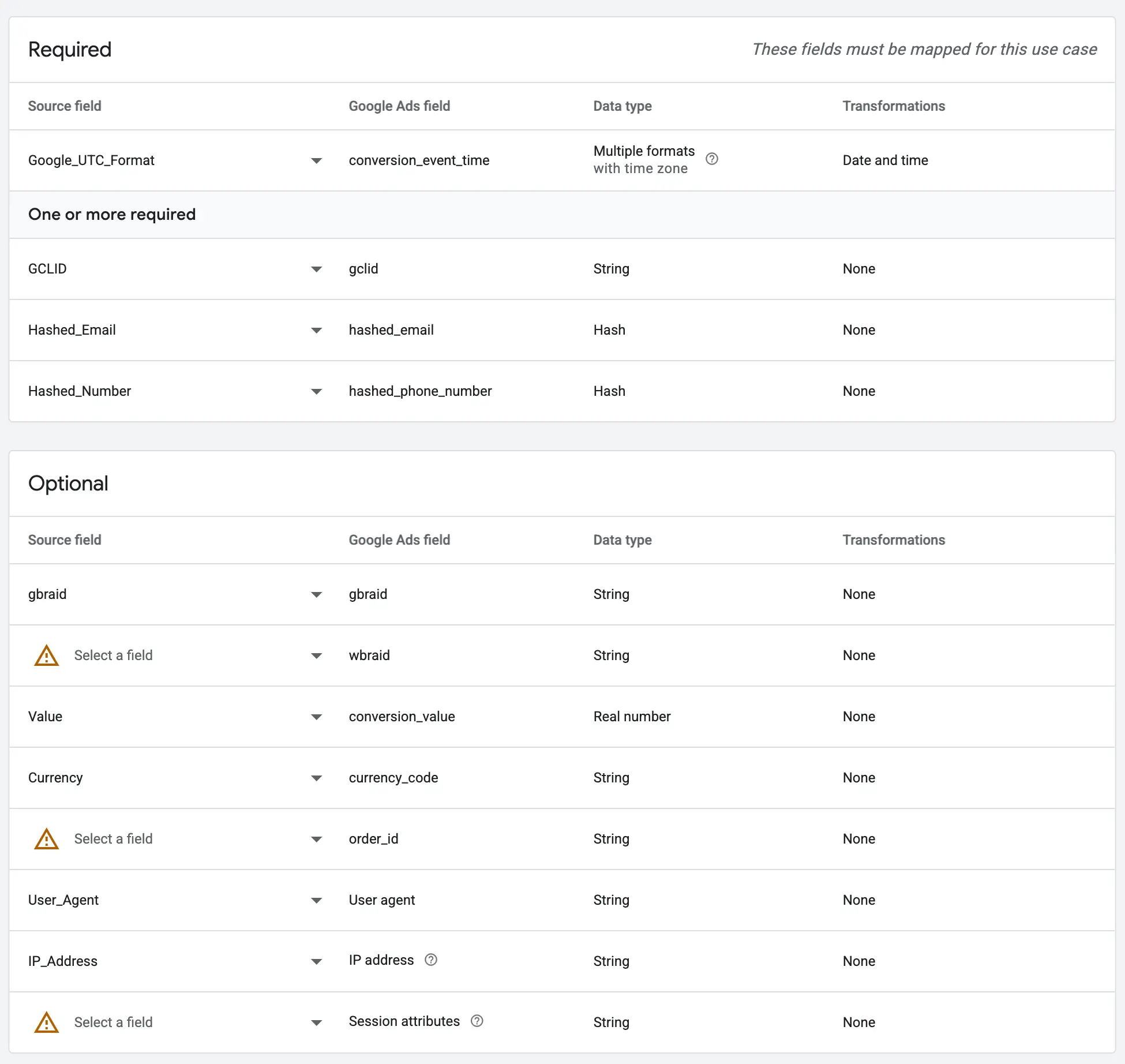
The template is essentially a structured file, usually a CSV or Google Sheet, that contains the identifiers and details Google needs to attribute a conversion correctly. If the data in this file is incomplete or incorrectly formatted, the conversion will fail to process.
At a minimum, the template requires the GCLID and a conversion time. The GCLID tells Google which ad click the conversion belongs to, while the conversion time specifies when the offline action occurred. The conversion time must fall within Google’s accepted attribution window and follow the required timestamp format.
In many lead-generation setups, Google also supports hashed user data, such as a hashed email address and hashed phone number. These fields are particularly important when enhanced conversions are enabled, as they help Google improve attribution accuracy in privacy-restricted environments. All user data must be securely hashed using SHA-256 before upload to remain compliant with Google’s policies.
Additional fields are optional but highly recommended where available. These include GBRAID and WBRAID, a conversion value to indicate lead or sale worth, and technical fields such as user agent and IP address to further assist attribution and verification.
One of the most common reasons offline conversions fail is missing or mismatched identifiers in the upload template. Ensuring that GCLID, GBRAID, or WBRAID is captured at the point of form submission and passed cleanly into the offline conversion template is critical for reliable reporting and smart bidding optimisation.
Using a WordPress Plugin to Automate GCLID Tracking
Manually tracking GCLID in WordPress is possible, but it is often unreliable and difficult to maintain. Custom scripts can break when pages are updated, form structures change, or additional tracking requirements like GBRAID and WBRAID are introduced. Even small implementation errors can result in lost identifiers, incomplete conversion data, and inaccurate reporting in Google Ads.
Automating GCLID tracking removes this risk. By capturing the identifier as soon as a user lands on your site and managing it consistently in the background, an automated approach ensures that critical tracking data is never dependent on URL parameters alone or fragile page-level logic. This is especially important for lead-generation websites where users often browse multiple pages before converting.
The key benefit of automated GCLID capture is consistency. A well-built solution stores the identifier securely, makes it available across the entire site, and injects it into form submissions at the exact moment the conversion occurs. This guarantees that every eligible lead can be correctly attributed back to Google Ads, even if the conversion happens hours or days after the initial click.
The WordPress plugin we built was created specifically to solve this problem. It automatically captures GCLID, GBRAID, and WBRAID, stores them securely, and attaches them to form submissions so they are ready for offline conversion uploads. This makes Google Ads offline conversion tracking far more reliable and significantly reduces the risk of data loss.
👉 Email us to Download and use the plugin for FREE to automate your GCLID tracking in WordPress. It’s time to ensure your Google Ads offline conversions are captured accurately from click to lead to sale.
Final Thoughts on GCLID and Offline Conversion Tracking in WordPress
Accurate offline conversion tracking is no longer optional if you want Google Ads to optimise correctly. Without GCLID, GBRAID, or WBRAID tied back to real leads and sales, Smart Bidding is forced to work with incomplete data, which often leads to higher costs and weaker performance over time. For WordPress websites in particular, relying on basic thank-you page tracking or URL parameters alone is one of the most common reasons offline conversions fail.
Capturing and persisting click identifiers correctly allows you to connect the full journey, from ad click to lead to closed sale. When done properly, Google Ads can optimise toward what actually matters, not just form submissions, but qualified leads and real revenue. This is exactly why automated tracking, rather than manual workarounds, delivers more reliable and scalable results. Offline conversion imports is also the single highest-leverage fix in our guide to fixing Google Ads spam leads.
If you are running lead-generation campaigns and want offline conversion data you can trust, the technical setup matters just as much as the ads themselves. That is where working with a specialist Google Ads agency adds real value. Beyond campaign management, a specialist agency understands attribution, offline conversion workflows, CRM integration, and how to structure data so Google’s algorithms can use it effectively. This is the same problem our purpose-built CRM solves for clients, connecting your sales pipeline directly to Google Ads so every GCLID ties back to real revenue instead of a form submission.
At SCOPE Digital, we specialise in Google Ads performance and advanced tracking implementations, including offline conversions for WordPress-based websites. We built our GCLID tracking plugin to solve a real-world problem we encountered repeatedly across client accounts, and we use it as part of a broader, data-driven approach to Google Ads optimisation.