
Spam leads in Google Ads are form submissions or calls generated by bots, irrelevant audiences, or low-intent users who have no genuine interest in your product or service. Fixing fraudulent leads requires a combination of tightened targeting settings, refined keyword strategy, accurate conversion tracking, and stronger form validation. Each of these levers works together. Relying on just one rarely solves the problem. This guide walks you through every major fix, from adjusting Google’s default location settings to implementing honeypot fields on your landing pages, so you can improve your Google Ads lead quality and stop wasting your budget on leads that go nowhere.
Keep in mind, managing your lead quality is just one element of running Google Ads well. See our Google Ads guide for how targeting, tracking, and campaign structure all work together.
If you’re still working out what a healthy budget looks like for your industry, see our breakdown of Google Ads costs in South Africa.
How to fix Google Ads spam leads problems with better targeting
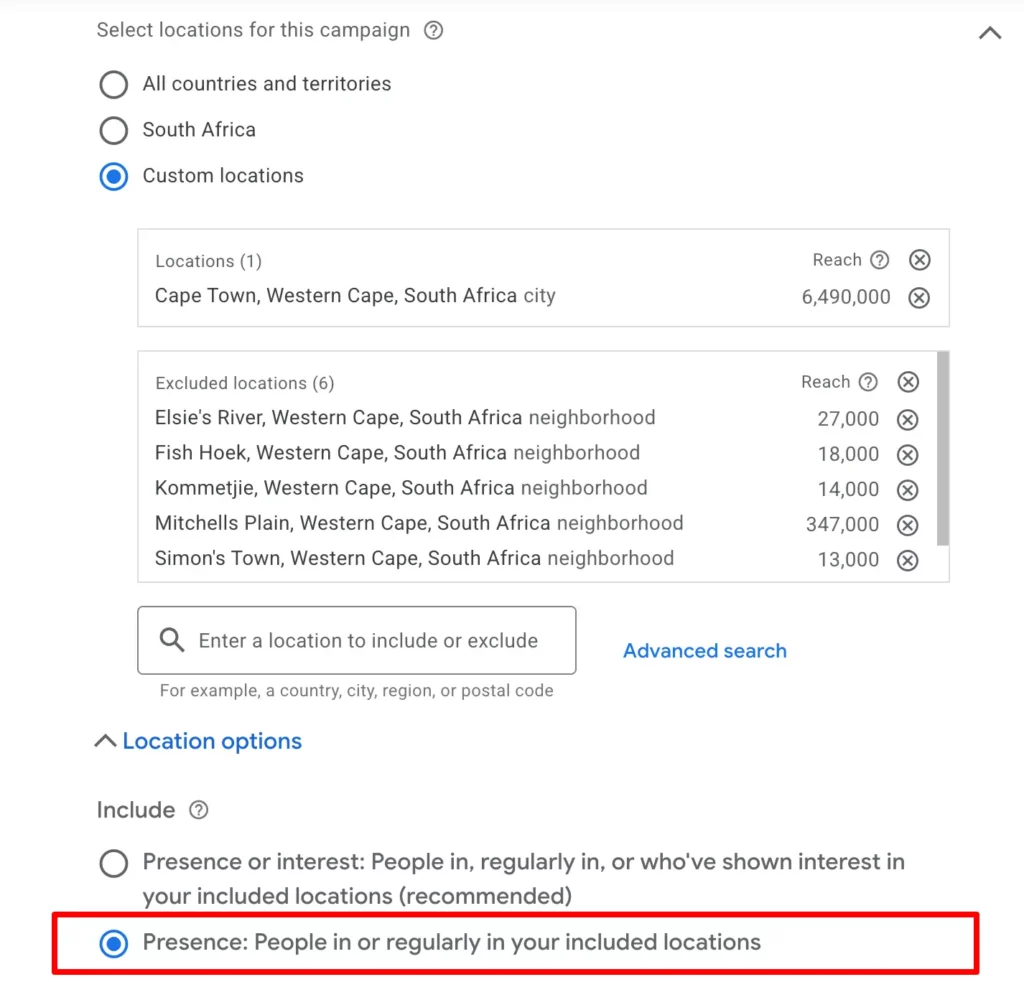
The single most overlooked cause of spam leads is Google’s default location setting. By default, Google Ads targets “People in, regularly in, or who’ve shown interest in your included locations”, which means your ads can show to users anywhere in the world who have recently searched for content related to your target area. That setting pulls in global traffic with no genuine local intent, and it inflates your lead count with irrelevant submissions.
The fix is straightforward. Go to your campaign settings, click “Locations,” then select “Advanced Search” and change the targeting option to “Presence: People in or regularly in your included locations” This restricts your ads to users physically present in your chosen geography. For a service business in Cape Town, that change alone can cut a significant portion of irrelevant traffic overnight.
Beyond location, these targeting adjustments also reduce spam:
- Device targeting: Reduce bids on mobile devices during off-peak hours, when bot activity tends to spike. Review your device performance reports and adjust bid modifiers accordingly.
- Ad scheduling: Exclude hours with consistently poor lead quality. If your data shows that leads submitted between midnight and 5AM never convert, exclude those hours entirely.
- Language targeting: Set language to match your actual audience. Leaving it on “All languages” invites traffic from users who cannot read your ad or your landing page.
- Demographic exclusions: If your service is not relevant to a specific age group, exclude them. Tighter demographic settings reduce the pool of low-quality traffic.
Always cross-reference your location performance report with your CRM data. If a suburb or region consistently produces leads that never close, add it as a location exclusion directly in your campaign settings.
For local service businesses (plumbers, electricians, HVAC companies, roofers, clinics, dentists, salons, lawyers, and similar businesses), it’s also worth considering Local Service Ads (LSAs) if they’re available in your country.
LSAs are currently offered in the United States, Canada, the United Kingdom, and parts of Europe for eligible industries. Because these ads appear above traditional Google Search ads and are designed specifically for local lead generation, they often attract higher-intent prospects while helping reduce irrelevant clicks. If your business qualifies, running LSAs alongside your Google Search campaigns can improve lead quality and increase visibility. For a deeper look at how Local Service Ads work, check out this guide that explains the basics and when they may be a good fit.
What keyword strategy reduces spam leads in Google Ads?
Broad match keywords are the most common cause of irrelevant clicks and unqualified leads. Phrase and exact match keyword types filter spam far more effectively because they restrict your ads to searches that closely match your intended query. Broad match, by contrast, can trigger your ad for searches that share only a loose semantic relationship with your keyword, pulling in traffic with no buying intent.
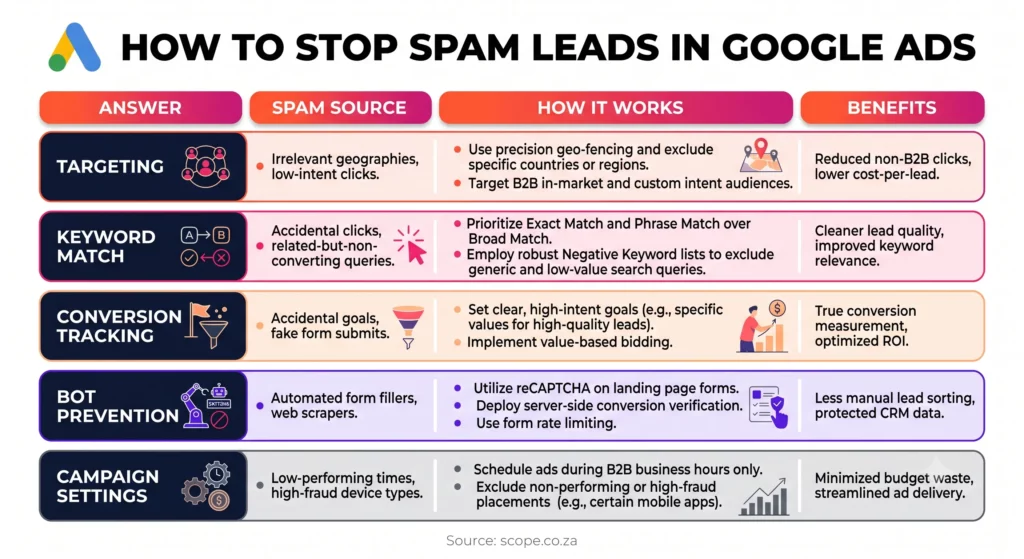
Intent-based keywords are the gold standard for lead quality. Phrases like “book a consultation,” “hire a plumber in Cape Town,” or “apply for a home loan” signal that the user is ready to take action. Generic terms like “plumbing” or “home loan” can attract researchers, students, and job seekers alongside genuine prospects. You can learn more about selecting the right terms in this keyword research guide.
Review your Search Terms report frequently, not monthly. New irrelevant queries appear constantly, and catching them early prevents wasted spend from compounding. Add anything that does not match your ideal customer to your negative keyword list immediately.
Keeping your keyword list tight is not a one-time task. Search behaviour shifts, and Google’s matching algorithms evolve. Audit your match types and negative keywords to maintain the quality gains you have worked to achieve. This is one of the most reliable Google Ads optimisation tips you can apply consistently.
How does conversion tracking affect lead quality in Google Ads?
Poor conversion tracking is the hidden driver behind many spam lead problems. Google Ads counts multiple micro-actions as conversions by default, which inflates your lead numbers and trains the bidding algorithm to chase quantity rather than quality. If your dashboards already look inflated, our guide to paid media reporting explains how to separate real leads from vanity conversions before the numbers reach your CFO. When the algorithm thinks a bot submission is a successful conversion, it actively seeks out more traffic just like it.
Fix your conversion tracking with these steps:
- Audit your conversion actions. Open your Google Ads account, go to “Tools and Settings,” then “Conversions.” Review every conversion action currently set as “Primary.”
- Demote micro-actions. Change page views, video plays, and scroll events to “Secondary” conversions. These should inform you but not drive bidding decisions.
- Set your primary conversion to a qualified action. A completed contact form, a phone call lasting more than 60 seconds, or a confirmed booking are examples of genuine lead signals.
- Import offline conversion data. Connect your CRM to Google Ads and upload the outcomes of your leads, specifically which ones became paying clients. Offline conversion tracking feeds real quality signals back to Google’s algorithm.
- Allow the algorithm time to relearn. After importing offline data, give your campaigns at least four weeks to adjust. Smart Bidding strategies like Target CPA (check our Google Ads glossary if these terms are new) will recalibrate toward the leads that actually convert.
Feeding qualified lead outcomes back to Google Ads is the most impactful single action you can take for long-term lead quality improvement. Without it, your bidding algorithm optimises for volume, and volume in a poorly targeted campaign means spam.
How do you stop bot submissions on Google Ads landing pages?
Bot-generated form submissions are a separate problem from poor targeting, and they require a different solution. Bots fill out forms automatically, often faster than any human could, and they do not behave the way real users do. Several techniques catch them before their data enters your CRM.
Honeypot fields are hidden form fields that are invisible to human visitors but visible to bots. When a bot fills in the hidden field, your system flags the submission as spam and discards it. This is a simple, low-cost baseline defence that requires no user interaction and adds no friction to the form experience.
Additional form validation methods include:
- Email domain validation: Reject submissions from known disposable email providers such as Mailinator or Guerrilla Mail. Validating email format and domain filters a large proportion of low-quality entries.
- Phone number format checks: Require a valid South African number format. A field that accepts “0000000000” or random strings lets bots through easily.
- Multi-step forms: Break your form into two or three steps. Bots often fail to complete multi-step sequences because they are designed for single-page submissions.
- Behavioural analysis: Tools that track mouse movement, typing speed, and scroll behaviour can flag submissions that do not match human patterns.
| Validation method | What it catches | Complexity |
|---|---|---|
| Honeypot fields | Unsophisticated bots | Low |
| Email domain check | Disposable addresses | Low |
| Phone format validation | Random number strings | Low |
| Multi-step forms | Automated single-page bots | Medium |
| Behavioural analysis | Advanced bots | High |
Combine at least three of these methods. No single technique catches everything, but layering them creates a defence that most bots cannot pass through.

What campaign settings help prevent spam leads?
Audience exclusions and campaign type choices have a direct impact on spam lead volume. Excluding known bot IP addresses prevents the same invalid traffic from clicking your ads repeatedly. You can add IP exclusions in your Account settings. If your server logs or CRM reveal a cluster of submissions from the same IP range, block it.
Performance Max campaigns are not recommended for lead generation when spam leads are already a problem. These campaigns use broad automated targeting across all of Google’s networks, which reduces your control over who sees your ads. Search campaigns with explicit intent keywords and tight match types give you far greater control and consistently produce higher-quality leads. If you’re already running Performance Max, tightening your Performance Max data exclusions can filter out existing customers and low-quality visitors before they inflate your lead count.
Audience signals also matter. Upload your existing customer list to Google Ads and use it as an audience signal for your Smart Bidding strategy. This guides the algorithm toward users who resemble your best clients. You can also exclude audiences that have historically produced poor leads, such as users who visited your site but spent less than ten seconds on the page. For broader context on overcoming paid acquisition challenges, combining audience signals with tight campaign settings is a proven approach.
Key takeaways
Fixing spam leads in Google Ads requires layering targeting fixes, keyword discipline, accurate conversion tracking, and form validation together, because no single change solves the problem on its own.
| Point | Details |
|---|---|
| Fix location targeting first | Switch from “People interested in” to “People in your targeted locations” to cut irrelevant global traffic. |
| Use phrase and exact match keywords | Tight match types and a maintained negative keyword list reduce low-intent clicks significantly. |
| Demote micro-conversions | Set page views and scroll events as secondary conversions so bidding optimises for real leads. |
| Import offline conversion data | Feeding CRM outcomes back to Google Ads trains the algorithm to find quality leads, not just volume. |
| Layer form validation methods | Combine honeypot fields, email domain checks, and multi-step forms to block bot submissions effectively. |
What most marketers miss when fixing spam leads
I have audited dozens of Google Ads accounts where the client was convinced the problem was bots. In most cases, bots were a minor factor. The real culprit was a combination of the default location setting, broad match keywords, and conversion tracking that counted every page view as a lead. Most spam lead problems stem from poor targeting, lax keyword strategy, and improper conversion tracking working together, not from one isolated issue.
The fix that delivers the biggest long-term improvement is also the one most advertisers skip: integrating CRM data with Google Ads through offline conversion imports. It takes time to set up, and the results are not immediate. But once the algorithm starts learning from your actual closed deals rather than from form submissions, lead quality improves in a way that no targeting tweak can replicate on its own.
My honest advice is to resist the urge to make one change and wait for a miracle. Run the targeting fix, the keyword audit, and the conversion tracking correction simultaneously. Then add the form validation layer. Give it six to eight weeks before drawing conclusions. Spam lead reduction is a process, not a single setting.
How SCOPE helps you get better leads from Google Ads
If you have worked through these fixes and are still seeing poor lead quality, the problem likely runs deeper than a single setting.
SCOPE is a Cape Town-based Google Ads agency that specialises in helping service businesses generate qualified leads and reduce wasted ad spend. Our team conducts full campaign audits covering targeting, keyword strategy, conversion tracking, and landing page validation. We also set up offline conversion imports and CRM integrations so your campaigns learn from real client data, not just form submissions. If you want campaigns that attract the right people and filter out the noise, get in touch with SCOPE to discuss a bespoke audit. You can also browse our Google Ads resources to see how we approach lead quality for service-based businesses.
Frequently Asked Questions
What causes spam leads in Google Ads?
Spam leads are caused by a combination of overbroad targeting settings, broad match keywords, and conversion tracking that counts low-value actions as leads. Bots and irrelevant audiences exploit these gaps to generate submissions that waste your budget.
How do I stop bots from submitting my Google Ads forms?
Add honeypot fields, validate email domains and phone number formats, and use multi-step forms. Layering these methods blocks the majority of automated submissions without adding friction for genuine users.
Does changing to exact match keywords reduce spam leads?
Yes. Phrase and exact match keywords restrict your ads to searches that closely match your intended query, which significantly reduces irrelevant clicks and unqualified lead submissions compared to broad match.
What is offline conversion tracking and why does it matter?
Offline conversion tracking lets you upload CRM data, such as which leads became paying clients, back into Google Ads. This trains the bidding algorithm to find more users who resemble your best customers rather than optimising for raw submission volume.
Should I use Performance Max for lead generation?
Performance Max campaigns are not recommended when spam leads are already a problem. Search campaigns with tight match types and explicit intent keywords give you greater control over who sees your ads and consistently produce higher-quality leads.